|
Main Window Menus
File Setup Aux Windows Help Index |
Import Options Sheet
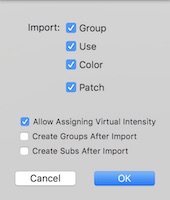
The Import Options Sheet determines what fields will be imported when reading channel information. The Import->Channel Data command allows reading channel data from a tab delimited text .txt or .xml file. Channel data can also be transferred by scripting. LXConsole accepts tab delimited channel data through the importChannelSummary AppleScript command. XML data can be set using the importXMLChannelSummary command. The example script included in the install also transfers the show data. Channels for devices that do not have an intensity address can be marked in channel data. You can choose use this information to assign these channels as having virtual intensity control. Group and/or Sub presets can be automatically created when importing channel data. The group field from the channel data is used to create a list. A preset is then created for each entry in the list. Each preset contains the channels associated with the group field at full. The preset's "what" field is set to the name of the group. Tab Delimited Channel Data The first column should always be the channel. If the text contains 5 columns, the preferences turn on and off each column individually. The columns must be in the order channel, group, use, color, patch. If the text contains other than five columns, the columns are assumed to be in the order that is set in the preferences. For example, it is possible to have channel data that consists of three columns. Consider data that has on each line of text: the channel, a tab, the use, a tab, and the patch (dimmers separated by commas). To correctly import this, only the "Use" and "Patch" would be checked in the preferences. |