Index -> Menu Reference -> Reports Menu Reference -> Summary Reports
Summary Reports
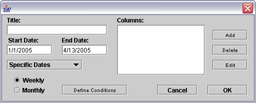
A summary report creates rows of weekly or monthly totals, averages or maximums of data fields. In addition to selecting the period you want the report to cover, you can define conditions for filtering data records (see list report). The columns in a summary report can calculate a value for the month or week from log entries or data fields.
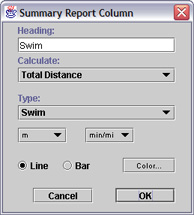
Log Entries
Columns that are calculated from log entries show a total, average, or maximum of log data corresponding to the selected event type. For these columns you can select the units for displaying the column's data. The units used, either distance or speed, will correspond to the calculation requested.
Data Fields
A column can also contain a total or average of data fields. In which case, the event type for the column is ignored. For columns generated by data fields, the units will be a numerical total or average that corresponds to the units used in that field.
Chart Options
Column options also include choices for charts. Columns use the color of the event type when they are graphed in a chart unless you select a different color. A chart can use either lines or bars to display a column's data. If neither is selected, the column won't appear in the chart. The 'x' axis of a chart is labeled by the first (leftmost) column.